About Didan POS: Restaurant System
Didan POS is a cloud-based restaurant billing and order tracking system designed for restaurants, cafes, bars, and fast-food businesses. Its user-friendly interface digitizes and accelerates your hospitality management....
Didan POS is a cloud-based restaurant billing and order tracking system designed for restaurants, cafes, bars, and fast-food businesses. Its user-friendly interface digitizes and accelerates your hospitality management.
Menu & Item Management
• Flexible Options: Define item modifiers that function as both subcategories and extra options, with optional custom pricing.
• Kitchen Routing: Assign menu items to specific kitchen or bar preparation areas.
• Bulk Price Updates: Instantly update all menu prices using percentages (%) or fixed amounts (+/-).
• Quick Setup: Import your menu items instantly using an Excel (CSV) file.
• Extra Charges: Define barcodes and add service fees, delivery charges, or tips based on order type.
Table & Order Tracking
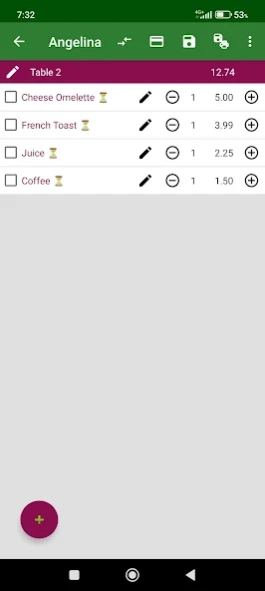
• Fast Order Entry: Add items quickly by tapping categories or scanning barcodes with your device camera.
• Table Management: Name tables, transfer active orders, or merge multiple tables easily.
• Split Bills: Split specific order lines and process partial payments seamlessly for groups.
• Detailed: Add custom tax rates, guest counts, delivery times, and kitchen notes to any ticket.
• Void Management: Enforce cancellation reasons for voided items and easily restore canceled orders.
Delivery & Customer Management
• Tableless Orders: Create direct orders under a customer's name for phone orders, takeouts, or deliveries.
• Courier Assignment: Assign delivery drivers (couriers) to takeout orders and track status.
• Contact Integration: Import your customer list from phone contacts or upload via Excel (CSV).
• Easy Communication: Access WhatsApp, SMS, or phone call shortcuts directly from the customer profile.
• Share Tickets: Send receipt and digital order details to customers via WhatsApp, SMS, or email instantly.
Easy Payments & Quick Sales
• Payment Methods: Define unlimited payment types such as Cash, Credit Card, and more.
• Flexible Cashout: Process a single bill using multiple payment methods simultaneously.
• Discounts: Apply fixed or percentage-based discounts to specific items or the total bill.
• Tax Management: Choose to display menu prices as either tax-inclusive or tax-exclusive.
Printing Solutions
• Wireless Support: Print bills and tickets via Bluetooth, Wi-Fi, or Network (LAN) printers.
• Web Printing: Send print jobs directly from a PC using the web application interface.
• Custom Receipts: Upload your logo and choose which data fields to display on the receipt.
• Hardware: Trigger automatic paper cutters, buzzers, or cash drawers if supported by your printer.
Users & Staff Permissions
• Secure Login: Sign in quickly using a Google account or email and password.
• Device-Based Users: Create separate waiter accounts for each Android device running the app.
• Granular Permissions: Fully restrict or allow specific actions for your staff down to the finest detail.
• Instant Control: Deactivate a staff member's active session instantly with a single tap.
• Audit Logs: Review a detailed history of all transactions and changes made to orders over time.
Kitchen Display, Stock & Reports
• Kitchen Monitor: Track orders live through stages like "Preparing" or "Ready" with sound alerts.
• Auto-Printing: Enable incoming kitchen orders to print automatically to respective stations.
• Stock Deduction: Items are automatically deducted from your inventory as soon as an order is placed.
• Low Stock Alerts: Monitor remaining quantities and receive notifications based on your safety limits.
• Expense Tracking: Manage shop expenses with customizable categories, supplier details, and tax records.
• Visual Reports: Track performance through interactive charts and detailed filters like date range.
Previous Versions
Here you can find the changelog of Didan POS: Restaurant System since it was posted on our website on 2020-07-15 13:17:12.
The latest version is 2.416 and it was updated on 2026-10-12 18:07:59. See below the changes in each version.
Didan POS: Restaurant System version 2.416
Updated At: 2026-10-11
Changes: Some issues have been fixed.
Didan POS: Restaurant System version 2.328
Updated At: 2024-03-20
Changes: New option for service: print after subtotal
Didan POS: Restaurant System version 2.324
Updated At: 2024-01-01
Changes: New language support: Azerbaijan
Didan POS: Restaurant System version 2.323
Updated At: 2023-12-22
Changes: New report: Daily sales report - simple
Didan POS: Restaurant System version 2.320
Updated At: 2023-12-14
Changes: New report: Best profits.
New columns have been added to some reports.
New options have been added to order settings.
To fully use these features, update your application on all Android devices you have ordered.
Didan POS: Restaurant System version 2.317
Updated At: 2023-12-11
Changes: Cost option added to menu and ready order descriptions
Didan POS: Restaurant System version 2.305
Updated At: 2023-11-12
Changes: New options have been added to user positions.
Didan POS: Restaurant System version 2.256
Updated At: 2023-09-10
Changes: Added quantity change option to remaining inventory
Didan POS: Restaurant System version 2.252
Updated At: 2023-08-29
Changes: Added shortcut of activity logs to order list and order entry
Didan POS: Restaurant System version 2.245
Updated At: 2023-07-07
Changes: New option in print settings